Your documentation.
Answers your customers can trust.
Give customers, partners and your support team an assistant that answers from your documentation and links to the page it used. ChatbotIQ does the reading, updating and delivery. Your team keeps writing the content.
Send us your documentation. We'll prepare your assistant for you.
Thanks, we're on it.
A person is now looking at your documentation. You will get an email with a link to your assistant within 2 business days.
Or set it up yourself in minutes: start the 14-day trial · From $45/mo
In production on more than 10,000 documentation pages



- An exact value, with a link to the page it came from
- When the question is ambiguous, it asks
- What the docs don't say, it won't say
A real recording. We indexed the public PostgreSQL 18 documentation so the demo runs on content that isn't ours. Not affiliated with or endorsed by the PostgreSQL project.
Your content changes. The assistant keeps up.
A prototype works on day one. The work is keeping it right as your pages change, month after month. That part is ours.
Reads every page, and keeps reading them
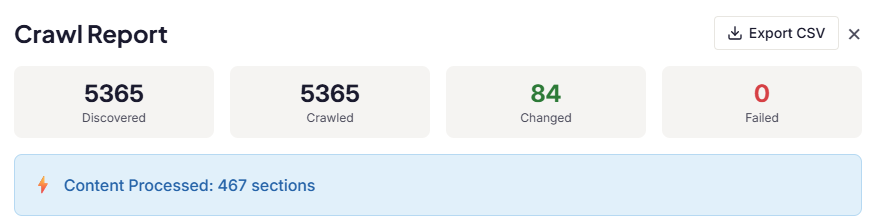
Confluence, help centers built as web apps, PDF manuals, long reference tables. ChatbotIQ reads them the way a person sees them and checks every page before it is used for answers. Pages are re-read on a schedule so answers stay current, and if one comes back incomplete, the previous good version stays in place.
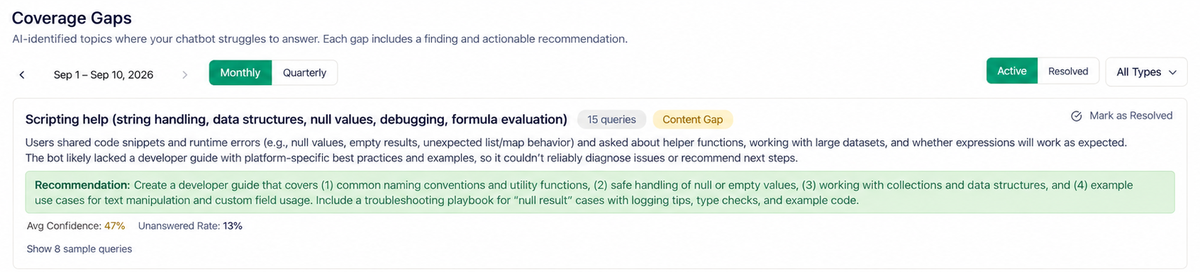
Shows you what customers asked that your docs don't answer
Every question the documentation could not answer is collected and grouped, so your content team gets a to-do list ordered by how often customers ask. And when the assistant should not answer at all, it hands the conversation to a person on your team.
How it works
No developers needed. Setup takes minutes; reading a large site takes longer, and you can watch it happen.
Connect your content
Paste a website address, upload PDFs, or connect Confluence or Notion. ChatbotIQ reads everything and checks it before use.
Test with real questions
Ask what your support team was asked last week. Check the answer and the page it links to. Fix the content where it falls short.
Put it where customers are
On your website with one line of code, in Slack, or inside your own app through the API. Same answers everywhere.
Build it, or buy it?
Building an AI chatbot takes a week. Building one your customers trust took us five months. And that was the cheap part.
A quick prototype sounds confident. The hard part is being right: saying "I don't know" instead of guessing, linking to a page that actually exists, reading the sites ordinary tools cannot, and keeping all of that true as AI models change, tools are retired and your own documentation moves on.
In eight months of running ChatbotIQ we have changed models, replaced tooling and updated dozens of components. Without that upkeep a chatbot quietly gets worse until someone notices it has been answering wrong for a week.
ChatbotIQ is in production on more than 10,000 pages of documentation and trusted by Pricefx, Wultra and Biodroga. It answers from your pages, and when it does not know, it says so.
| Choose | When |
|---|---|
| Build it yourself | The chatbot is your product, and your team will keep owning it. |
| Buy ChatbotIQ | You want questions already answered in your documentation off your support team's desk, and your developers on your actual product. |
| Build on ChatbotIQ | You need your own interface or workflow. Use the answers through the API or MCP and keep the maintenance with us. |
Already using another tool? Compare on your own documentation, not on feature lists.
Try it on your hardest questions.
The trial is a real evaluation, not a demo. Three steps, one afternoon.
Step 1
Add one source
Your documentation site, a PDF, or a Confluence space.
Step 2
Ask ten real questions
Take them from recent support tickets. Include one the docs do not answer.
Step 3
Check the answers and the links
Is each answer right? Does the linked page support it? Did it say "I don't know" when it should?
How long before it answers well?
Setup takes minutes. Reading a large site can take a few hours, and you can test as soon as the first pages are in.
What if the docs don't cover it?
The assistant says so instead of guessing, offers to connect a person from your team, and the question lands on your content to-do list.
Is our data safe?
Processed in the EU, GDPR-compliant, SOC 2 Type II in progress. See our privacy policy and subprocessors.
14-day Standard trial, up to 10,000 pages · No credit card · From $45/mo after
Rather not set it up yourself? Let us prepare it for you.
Read the docs